
Most AI song generators were built for desktop browsers first, and the mobile experience—if it exists at all—feels like an afterthought. Tiny buttons, broken layouts, and generation queues that time out before a track finishes make phone-based creation more frustrating than productive. Yet for the growing number of creators who film, edit, and publish entirely from a mobile device, the desktop-first assumption no longer matches how work actually happens. I tested three free platforms specifically for their phone-based usability, evaluating not just output quality but whether the entire workflow—from prompt to publishable file—functions smoothly on a screen that fits in one hand.
The AI Song Generator opens this comparison because it takes the simplest approach to mobile accessibility: no app required, no account setup, just a browser-based tool that adapts to a phone screen. That design choice has practical implications for anyone who needs music while away from a desk.
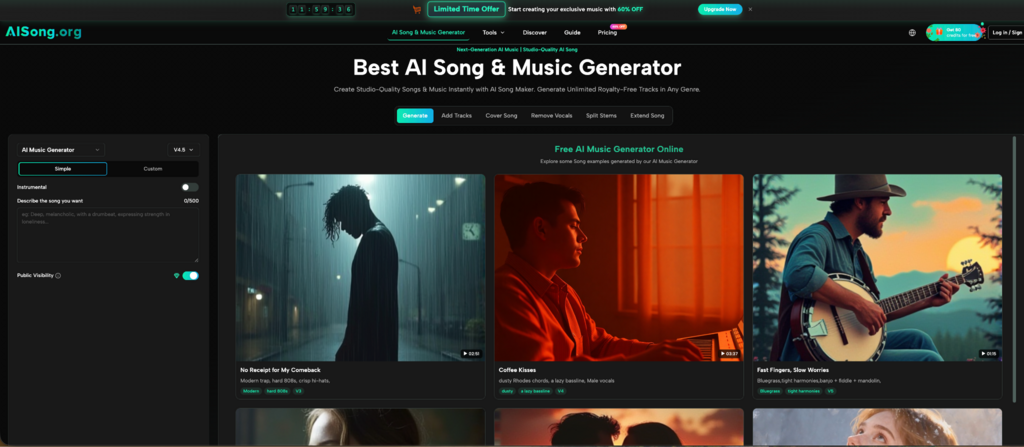
Aisong.org: Instant Browser Access Without Installation
The platform operates entirely through a mobile-responsive website, which means the experience begins the moment a browser tab opens. There is no App Store search, no download wait, and no storage space consumed on the device. For someone standing on a shoot location who realizes the edit needs a custom backing track before the day ends, that immediate access changes what is possible.
The Mobile Workflow from Start to Download
On a phone screen, the interface stacks vertically without horizontal scrolling. The text input field accepts a music description in plain language, and the optional lyrics field sits directly beneath it—no tab switching or hidden panels. I described a short acoustic instrumental for a social media reel, and the generation queue indicator stayed visible without requiring zoom gestures. When the track finished, playback started directly in the browser, and the download button produced a high-quality MP3 saved to the phone’s local storage. The entire sequence—open browser, type prompt, listen, download—required no account creation and no app installation. This matters for creators who use multiple devices, borrow a phone, or work from a device where installing new software is restricted.
Commercial Rights That Travel with the File
The platform grants royalty-free commercial use on generated music, with no attribution requirement. On mobile, where content often moves from a phone editor directly to TikTok, Instagram, or YouTube without passing through a desktop review stage, this licensing clarity prevents a common scenario: publishing a video with music that triggers a copyright claim hours later. The terms remain consistent regardless of which device initiated the generation, and checking the policy requires no more than scrolling the same page where the music was made. For solo creators managing every aspect of production from a phone, eliminating the licensing research step saves not just time but the anxiety of wondering whether a track is safe to monetize.
Where the Mobile Experience Shows Its Limits
The browser-based approach trades feature depth for accessibility. There is no offline mode, no background generation while using other apps, and no multi-track editing interface. Complex prompting with long, detailed descriptions becomes tedious on a phone keyboard, and the queue indicator may be harder to monitor during multitasking than a native app notification would be. These are not dealbreakers for the core use case—quick, publishable background music—but creators who want to build elaborate song structures with section-level editing will eventually want a larger screen or a dedicated application.
Suno: A Full-Featured Mobile App with a Non-Commercial Free Tier
Suno offers dedicated mobile applications for both iOS and Android, a distinction that signals investment in the phone experience beyond a responsive website. The app provides access to the same generation engine that made Suno a recognized name in AI music, with the free tier delivering 50 daily credits for approximately 10 song generations.
What the App Experience Delivers on a Phone
The Suno mobile app packages the platform’s full generation capabilities into a touch-optimized interface. Prompt entry, playback, and library management all function natively, with the app handling background processing and sending push notifications when a generation completes. This notification feature alone makes the app more practical for multitasking creators who want to start a generation and switch to editing footage while the track builds. The vocal quality—Suno’s primary strength—translates fully to the mobile experience, with the same realism and genre versatility available on the phone as on the desktop version.
The Licensing Constraint on Free Tier Output
Songs generated on Suno’s free plan, whether created on mobile or desktop, are restricted to non-commercial use. This limitation has particular consequences for mobile-first creators, who often publish directly from their phone to monetized platforms. A track made on the Suno app during a commute cannot legally appear in a monetized YouTube video or a sponsored Instagram post. The platform’s documentation makes clear that upgrading to a paid plan after generating a track does not retroactively grant commercial rights to that track. This means the free mobile app functions as a testing and prototyping environment rather than a production tool for revenue-generating content.
Who Benefits Most from Suno on Mobile
Songwriters who capture melodic ideas on the go, content creators prototyping musical directions before committing to a licensed track, and hobbyists exploring AI music for personal enjoyment will find Suno’s mobile app delivers the highest vocal quality among the three platforms tested. The native app experience feels polished, and the push notification system integrates naturally with phone-based workflows. The limitation only matters when the output needs to generate revenue, and for many mobile users whose primary output is personal rather than commercial, that restriction may never become relevant.
Udio: Professional-Grade Audio in a Mobile Interface
Udio launched its iOS mobile application with the same production-focused philosophy that distinguishes its web platform. The free tier provides 10 daily credits plus 100 monthly credits, with free accounts capped at three 130-second songs per day. The mobile app includes core features from the web version: song generation, cover art creation, playlist management, and a discovery feed for community content.
Audio Fidelity and Editing Depth on a Phone Screen
Where Suno emphasizes vocal presence and commercial accessibility, Udio prioritizes sonic detail. In mobile testing with identical prompts, Udio’s output consistently exhibited cleaner stereo separation and tighter low-end control—qualities that survive phone speaker playback but become even more apparent when listening through headphones or connecting to external speakers. The app includes editing tools that allow users to refine generated tracks, though the smaller screen naturally constrains the precision available compared to a desktop editor. For musicians who already understand arrangement and want mobile access to a tool that respects production values, Udio offers the strongest audio quality in this comparison.
Attribution Requirements and Practical Implications
Udio’s free tier permits commercial use but requires attribution—typically a credit line such as “Created with Udio” in a video description or project notes. Paid plans remove this requirement. For mobile creators publishing to platforms where description text is standard practice, such as YouTube or a podcast feed, adding attribution represents minimal friction. For contexts where credits are less natural—a client deliverable, a white-label project, or a platform with limited metadata fields—the requirement introduces a consideration that Aisong.org’s no-attribution policy avoids entirely.
The iOS Limitation and Platform Availability
Udio’s mobile app is currently available on iOS, with no Android equivalent at the time of testing. This platform exclusivity means roughly half of mobile creators cannot access Udio’s native app experience and would need to use the web version on their phone browser instead. The web version functions on Android devices, but the experience lacks the push notifications and background processing that make the iOS app feel integrated with the device. Android users who prioritize mobile music generation should verify current platform availability before depending on Udio as a primary tool.
Mobile Workflow Comparison at a Glance
The following table focuses specifically on the factors that affect phone-based creation, where installation friction, notification behavior, and licensing clarity matter as much as audio quality.
| Platform | Mobile Access Method | Installation Required | Offline Support | Commercial Rights on Free Tier | Best Mobile Use Case |
| Aisong.org | Mobile-responsive browser | No | No | Yes, royalty-free, no attribution | Quick background tracks for social content, publishable immediately without app installation |
| Suno | Native app (iOS and Android) | Yes, via App Store or Google Play | No | No, free tier is non-commercial only | Songwriting on the go and personal creative projects with best-in-class vocal quality |
| Udio | Native app (iOS only) and web browser | Yes for native app | No | Yes, with attribution required on free tier | Musicians who prioritize production polish and primarily use Apple devices |
The AI Song Maker serves the broadest mobile audience by removing the installation barrier entirely. A creator using any modern smartphone with any operating system can open a browser, generate music, and download a commercially usable file within minutes. This universality matters for teams where different members use different devices, for creators who work across multiple phones or tablets, and for situations where installing new software is impractical. Suno’s mobile app offers a more polished native experience with superior vocal quality, but the non-commercial restriction on the free tier limits its role to experimentation for anyone who monetizes content. Udio delivers the most refined audio output among the three, but the iOS-only native app and the attribution requirement narrow its fit to a specific subset of mobile creators.
For the growing population of creators who film, edit, publish, and monetize entirely from a phone, the most valuable free AI song generator is not necessarily the one with the highest fidelity or the most editing features. It is the one that produces a legally safe, usable file without asking the creator to install, register, attribute, or wonder whether the track will trigger a takedown after publication. On a small screen with a deadline approaching, that simplicity is not a compromise. It is the product.